
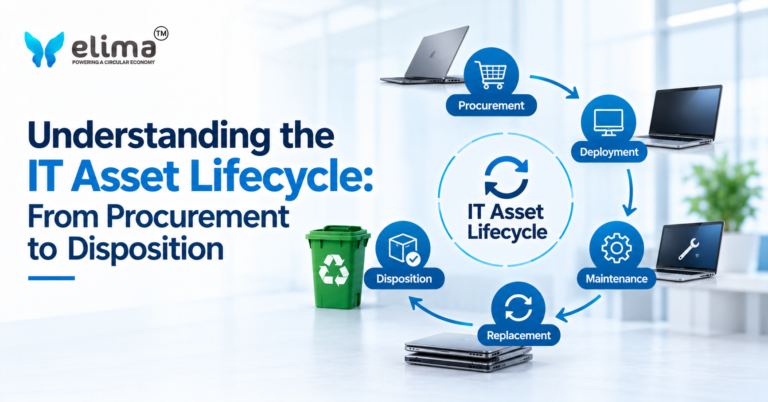
Every laptop, server, networking device and other piece of IT equipment has a lifecycle.
It begins when an organisation decides what technology it needs and purchases an asset. The asset is then deployed, used, maintained and eventually replaced or retired.
But retirement is not necessarily the end of the asset’s value.
A structured IT asset lifecycle continues through disposition, where equipment can be reused, refurbished, remarketed, recycled or processed for material recovery depending on its condition and remaining value.
For businesses managing hundreds or thousands of technology assets, understanding this complete lifecycle can improve asset visibility, data security, cost management and recovery outcomes.
Table of Contents
ToggleThe IT asset lifecycle is the series of stages an IT asset goes through from acquisition to its eventual retirement and final disposition.
A simplified lifecycle looks like:
Procurement → Deployment → Use → Maintenance → Retirement → Disposition → Recovery
The exact lifecycle can vary depending on the type of equipment and the organisation.
For example, a laptop may have a relatively short replacement cycle, while a server or networking system may remain in operation for considerably longer.
The important point is that an asset should be managed throughout its lifecycle rather than only when it is purchased or replaced.
Managing IT equipment effectively involves more than knowing where devices are located.
Businesses also need to consider:
Without a structured lifecycle, businesses can lose visibility at different stages.
An asset may be purchased but poorly tracked. A device may be retired without secure data handling. Functional equipment may be sent for recycling even though it could have been reused.
Lifecycle management helps connect these decisions.
The lifecycle begins when an organisation decides to acquire an IT asset.
Procurement decisions can include:
At this stage, organisations can also establish the information needed to track the asset later.
This may include:
Good records at procurement create a stronger foundation for the rest of the lifecycle.
Once purchased, the asset is prepared and assigned to its intended user, department or location.
Deployment can include:
The asset officially becomes part of the organisation’s operational environment.
Its location, user and status should ideally be reflected in the organisation’s asset records.
During active use, the organisation’s focus shifts towards performance, availability and security.
The asset may be:
Asset records should continue to be updated when equipment moves between users, departments or locations.
This helps prevent inventory records from becoming outdated.
IT assets do not remain static throughout their useful life.
They may require:
Maintenance can extend the useful life of equipment and delay replacement.
In some cases, upgrading a component can be more practical than replacing the entire device.
This stage also provides useful information about the asset’s condition when retirement eventually becomes necessary.
Eventually, an asset may reach the point where it should no longer remain in active use.
This can happen because:
Retirement should be planned rather than treated as an informal handover.
At this stage, organisations should determine:
This is where IT Asset Disposition (ITAD) becomes central to the lifecycle.
ITAD manages the process after an IT asset is retired.
A typical ITAD process can include:
Asset Identification
↓
Secure Collection
↓
Data Sanitisation
↓
Condition Assessment
↓
Reuse / Refurbishment / Remarketing
↓
Recycling / Material Recovery
ITAD ensures that retirement does not simply mean removing equipment from an office or server room.
Instead, each asset is evaluated and directed towards an appropriate next stage.
The lifecycle does not necessarily end when the equipment leaves the organisation.
The final stage can involve:
For businesses, documentation can be particularly important.
Records may include:
This creates a documented endpoint for the asset lifecycle.
ITAD primarily operates during the retirement and disposition stages, but it connects with several earlier stages.
For example, accurate procurement and inventory records make asset retirement easier to manage.
A simple lifecycle can therefore be represented as:
Procure
→ Deploy
→ Use
→ Maintain
→ Retire
→ Assess
→ Reuse / Refurbish / Remarket
→ Recycle / Recover
This shows that ITAD is not simply the final act of disposing of equipment.
It is the process that determines what happens after an asset leaves active use.
Data security should not begin when a device is retired.
It should be managed throughout the asset lifecycle.
During active use, organisations may have controls covering:
When an asset is retired, another question becomes critical:
What happens to the information stored on the device?
Laptops, desktops, servers and storage devices can retain sensitive information even after they are removed from active systems.
Before reuse, refurbishment, remarketing or recycling, appropriate data sanitisation or destruction should therefore be carried out based on the organisation’s requirements.
What Happens to IT Assets After Retirement?
A retired asset can have several possible pathways.
Reuse
The device may be redeployed internally if it still meets operational requirements.
Refurbishment
The equipment may be repaired, cleaned, upgraded and tested for continued use.
Remarketing
Suitable equipment can potentially be sold or transferred into a secondary market after appropriate data handling and testing.
Component Recovery
Useful components may be recovered from equipment that cannot be reused as a complete product.
Recycling
Equipment that is no longer suitable for reuse can be dismantled and processed for material recovery.
The important point is that not every retired asset needs to follow the same pathway.
Traditional IT asset management can be viewed as:
Purchase → Use → Replace → Dispose
A more resource-conscious lifecycle looks different:
Purchase → Use → Maintain → Reuse → Refurbish → Remarket → Recycle → Recover
This approach recognises that an asset can retain value beyond its original use.
A laptop may have another user.
A server may have another application.
A component may be recovered.
A plastic housing may become secondary raw material.
Metals can be recovered and re-enter manufacturing processes.
The objective is not to keep every asset in use indefinitely. It is to determine where value remains and recover it appropriately.
Businesses managing large technology inventories often encounter several challenges.
Inaccurate Asset Records
If an organisation does not know exactly what equipment it owns, retirement becomes more difficult.
Unclear Ownership
Devices may move between employees or locations without asset records being updated.
Unplanned Retirement
Equipment may be replaced without a defined process for determining its next pathway.
Data Security Gaps
Storage devices can leave organisational control without appropriate data sanitisation.
Missed Reuse Opportunities
Functional equipment may be recycled without being assessed for refurbishment or redeployment.
Limited Downstream Visibility
Businesses may know that equipment was collected but have little information about what happened afterward.
Inconsistent Documentation
Missing records can make audits and internal reporting more difficult.
A structured lifecycle management programme can address these issues by defining processes at each stage.
Maintain Accurate Asset Records
Record important information from procurement through retirement.
Track Changes
Update records when equipment moves between users, departments or locations.
Plan Retirement
Do not wait until equipment is physically removed before deciding what should happen next.
Build Data Security Into Disposition
Define how data will be sanitised or destroyed before equipment leaves organisational control.
Assess Before Recycling
Determine whether equipment can be reused, refurbished or remarketed before sending it into material recovery.
Maintain Chain of Custody
Track assets as they move from the organisation to processing facilities.
Document Final Outcomes
Maintain records of reuse, refurbishment, remarketing, recycling and material recovery.
These practices create a more complete view of the asset lifecycle.
At ELIMA, IT Asset Disposition forms part of a broader approach to managing technology assets beyond their active operational life.
Retired IT equipment can be assessed to determine whether it is suitable for reuse, refurbishment or further recovery.
Where equipment remains viable, refurbishment can help extend its useful life. When continued use is no longer practical, assets can move towards appropriate dismantling, recycling and material recovery pathways.
This connects ITAD, refurbishment and material recovery within the broader IT asset lifecycle.
For businesses, the objective is to create a controlled transition from an active IT asset to its next appropriate use or recovery pathway, while maintaining visibility and documentation along the way.
1. What is an IT asset lifecycle?
An IT asset lifecycle is the complete journey of an IT asset from procurement and deployment through active use, maintenance, retirement and final disposition.
2. What are the main stages of the IT asset lifecycle?
The main stages are procurement, deployment, active use, maintenance, retirement, IT asset disposition and final recovery or reporting.
3. What is ITAD?
IT Asset Disposition, or ITAD, is the structured process of managing IT equipment after it is retired. It can include data sanitisation, reuse, refurbishment, remarketing, recycling and material recovery.
4. Does the IT lifecycle end when an asset is retired?
No. Retirement marks the transition from active use to disposition. The asset may still have product, component or material value.
5. What happens to IT assets after retirement?
Depending on their condition, they may be reused, refurbished, remarketed, dismantled or recycled.
6. Why is asset tracking important?
Tracking helps organisations know what equipment they own, where it is located, when it was retired and what happened to it after retirement.
7. When should an asset be recycled?
Recycling should generally be considered when an asset is no longer suitable for practical reuse, refurbishment or remarketing, subject to the appropriate assessment and recovery process.
8. How does refurbishment fit into the IT lifecycle?
Refurbishment can extend the useful life of suitable equipment after its original owner retires it. It sits between active use and final material recovery.
The IT asset lifecycle does not end when a laptop is replaced or a server is taken offline. It continues through retirement, assessment and final disposition.
A well-managed lifecycle allows businesses to maintain asset visibility, protect data, extend the useful life of suitable equipment and recover value from assets that can no longer be reused.
The goal is not simply to move old technology out of the organisation. It is to understand what happens at every stage, from procurement to disposition, and make sure each asset follows the most appropriate pathway. ELIMA’s approach to IT asset lifecycle management brings together assessment, refurbishment and material recovery to help extend and recover value beyond an asset’s original use.